})();
Welcome to SNEAKTECH, One Stop Shop For All Your Gaming Needs!
FlatSat

$120.00

Description

What is FlatSat?

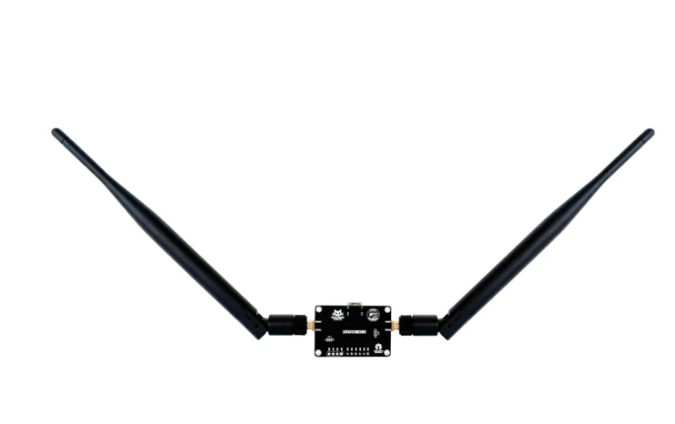
FlatSat is a satellite testbed for the classroom, made by Electronic Cats in collaboration with PwnSat: a flat training board that simulates a small spacecraft, with an RP2040, two LoRa radios and sensors, so you can learn satellite and space-systems cybersecurity hands-on. It is built to be vulnerable on purpose and ships preloaded with intentionally vulnerable firmware that mimics real spacecraft systems, so you can practice binary exploitation and reverse engineering safely on hardware you own. Setup is simple: connect over USB, enter bootloader mode and drag a precompiled firmware file onto the board, with no coding or soldering required. FlatSat then guides you through a 3-level CTF (web and RF, systems and the CCSDS protocol, then firmware and crypto), with an onboard NeoPixel LED confirming each stage. It uses only license-free ISM radio bands and never touches real satellites, so training stays self-contained on your own board.

Work through a 3-level satellite CTF

Progress through three levels of challenges: Level 1 covers web interfaces and cleartext RF, Level 2 covers onboard systems and the CCSDS protocol, and Level 3 tackles firmware and cryptography. A NeoPixel LED changes color to confirm every milestone, so you always know where you stand without a serial monitor.

Confirm the downlink without touching the board

Confirm FlatSat’s simulated satellite is actually transmitting by capturing its LoRa downlink with an RTL-SDR dongle and SDR++ — no cable, no connection to the board required. It’s a genuine over-the-air signal, captured entirely within license-free ISM bands.

Run a workshop or classroom CTF lab

Teaching space-systems security to a class or a workshop group? Give each learner a FlatSat and the FlatSat Ground Station, run the three CTF levels as a self-paced Home Lab or a condensed instructor-led Workshop, and let the NeoPixel LED confirm every level cleared, so you can check progress around the room without a serial monitor.

Start in 10 minutes

  1. Connect the FlatSat board to your computer via USB.
  2. Enter bootloader mode: hold BOOT, tap RST, then release BOOT — the board mounts as a USB mass-storage drive.
  3. Download the latest flatsat-firmware.uf2 file from the FlatSat GitHub releases.
  4. Drag and drop flatsat-firmware.uf2 onto the board’s mass-storage folder; it unmounts automatically once flashing succeeds.
  5. Head to the FlatSat wiki to pick your starting CTF level and curriculum format (Home Lab or Workshop).
MCU RP2040 (dual-core ARM Cortex-M0+)
Radio 2x SX1262 LoRa transceivers (uplink + downlink)
Environmental sensor BME280 (pressure, humidity, temperature)
Accelerometer LIS2DH12, 3-axis (I2C)
Status LED WS2812B NeoPixel (GPIO 15)
Exposed interfaces I2C, UART, SWD
Operating voltage 3.3V I/O
Dimensions 41 mm x 78 mm
Flash memory 4 MB (no filesystem partition)
RF band 433 MHz / 915 MHz (license-free ISM)
Open hardware CERN Open Hardware Licence v1.2

Reviews

There are no reviews yet.

Be the first to review “FlatSat”

Your email address will not be published. Required fields are marked *

Related

Related Products